


 Transfer

LBank Pay is a crypto payment service launched by LBank, designed to provide users with a secure, efficient, and seamless payment experience. Through the LBank App, users can complete payments conveniently and expand the use of digital assets across everyday spending scenarios. Users are welcome to experience LBank Pay and enjoy a smarter, more flexible way to pay with crypto.
Preparation
Before using LBank Pay, complete the following:
-
Download the LBank App:Search for “LBank” on the App Store or Google Play,download the official app, and register/log in with a Mobile Number or Email.
-
Complete KYC Verification:Users meeting KYC requirements are advised to complete KYC Verification to unlock higher limits and full functionality.
-
Ensure USDT Balance:LBank Pay uses USDT for payments. Transfer USDT to your spending account in advance.
-
Confirm Feature Availability:LBank Pay is available only in specific regions and for eligible accounts:
-
KYC verification required;
-
The system automatically detects and enables the feature. If conditions are not met, the LBank Pay entrance will not appear in the app or will display「Service Unavailable」.
-
Payment Limit Inquiry (in USDT):
📌Actual limits are subject to real-time display in the app and may change due to regulatory updates. Completing KYC is recommended for higher limits and full access.
Initial List of Newly Supported Payment Assets
📌 LBank Pay will continue to monitor market demand and ecosystem development and gradually expand the list of supported assets over time.
How-to Steps
LBank Pay supports two payment scenarios: fixed-amount payments (merchant-specified amount, scan to confirm) and variable-amount payments (scan first, then enter amount manually). The following uses Brazil PIX as an example.
General Preparation
-
Open the LBank App and log in;
-
When payment is needed, tap the scan icon in the top-right corner of the homepage (visible only if region and KYC conditions are met and scan-to-pay is supported);
-
Ensure sufficient USDT balance. For recharge details, refer to:
-
Grant camera permissions to the LBank App.
Step 1: Scan to Pay
Tap the「Scan」 icon in the top-right corner of the LBank homepage, align with the merchant’s PIX QR code, and the system will parse it automatically:
-
Fixed-amount code: The payable amount (e.g., 500 BRL) is displayed after scanning.
-
Variable-amount code: The payment page opens with a blank amount field; manually enter the payable amount (e.g., 300 BRL).
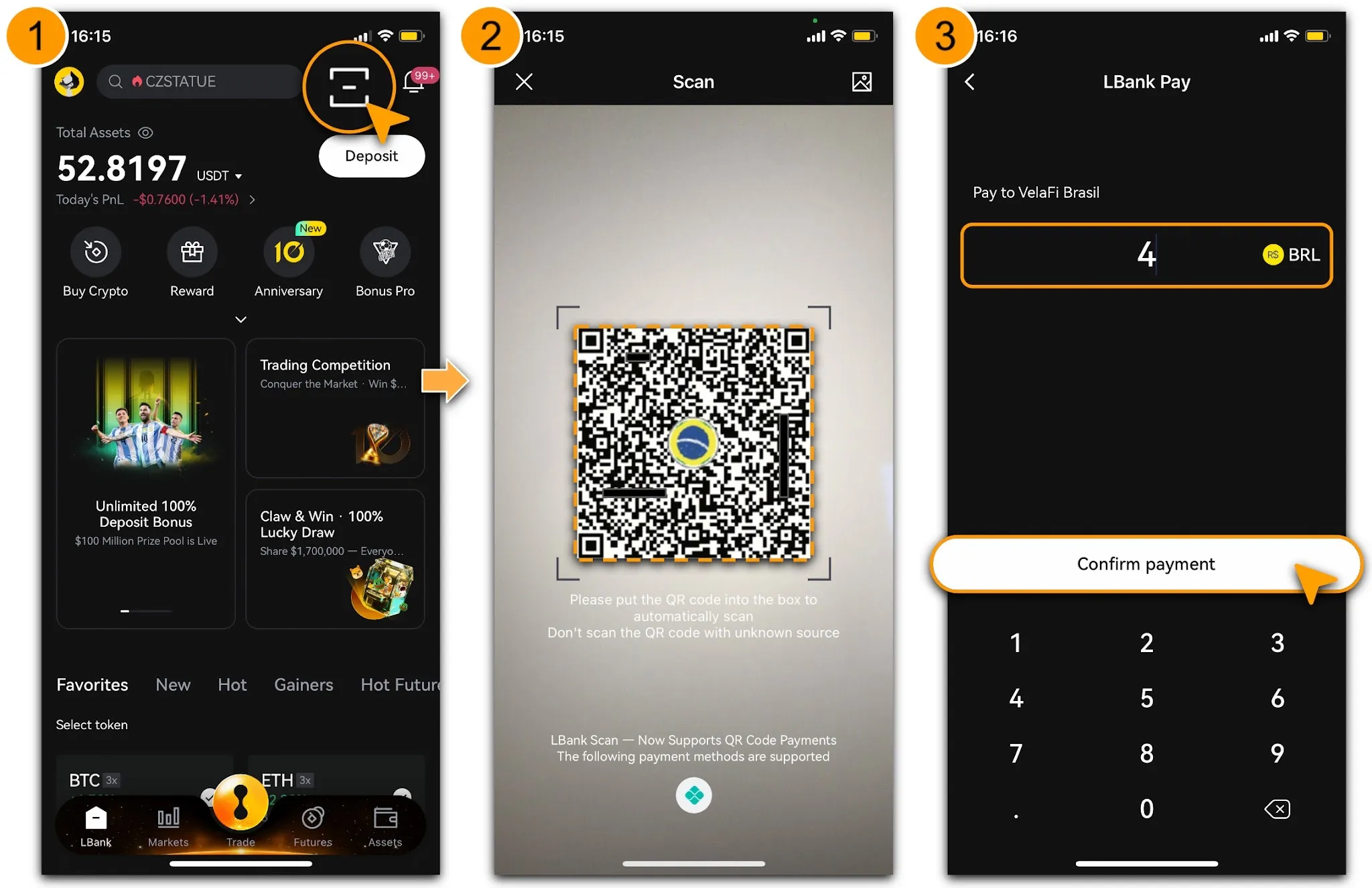
step
Step 2: Confirm Details & Pay
-
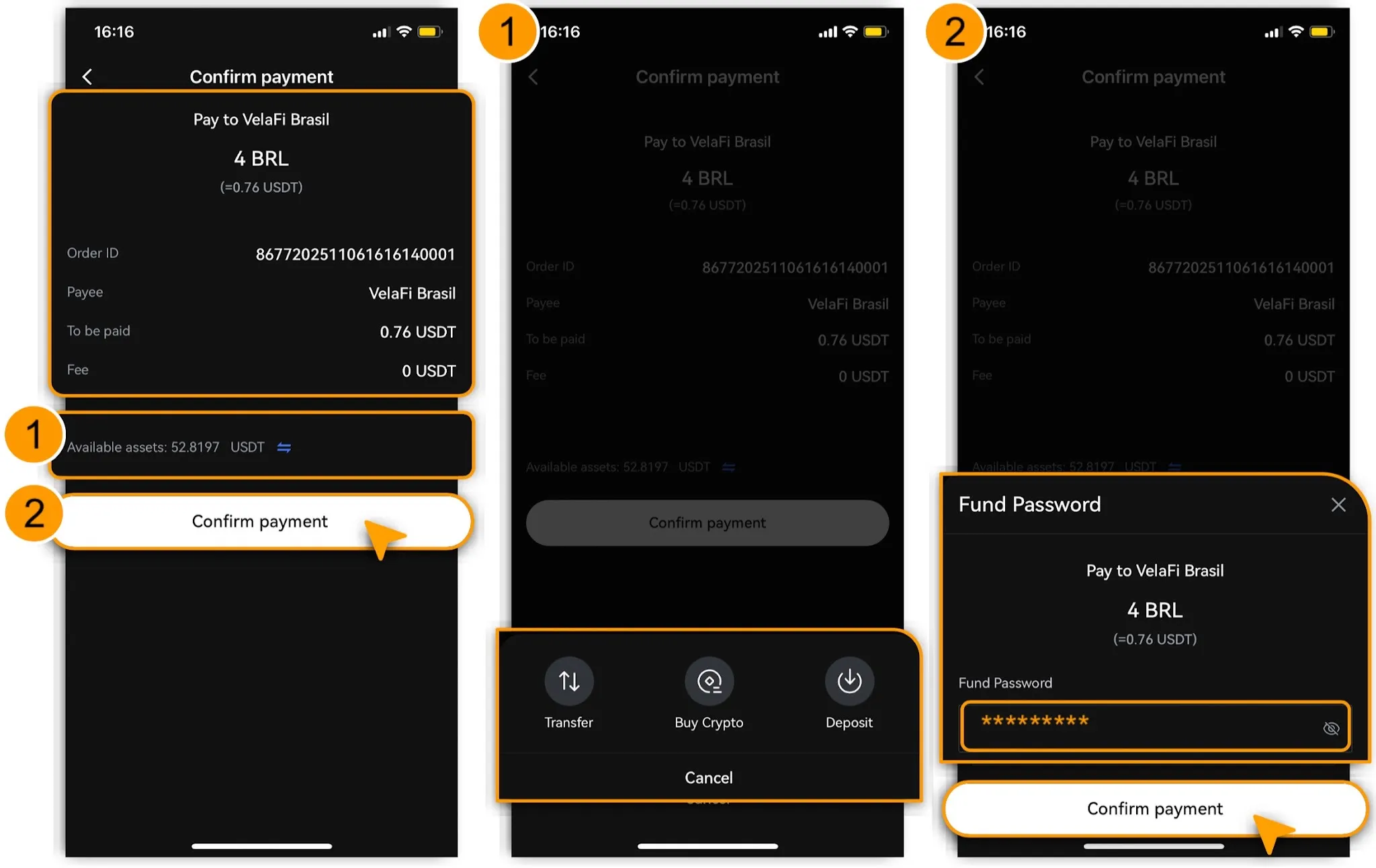
Before tapping「Confirm Payment」,carefully verify the following:
-
Order ID
-
Payee
-
Amount to be paid (in USDT)
-
Handling Fee (charged by the payment channel)
📌The system displays the deduction amount in USDT in real time (based on the latest exchange rate).
-
If available balance is insufficient, tap「🔁 Deposit」to top up via a suitable method.
-
After confirming order details, tap「Confirm Payment」and enter your「Fund Password」.
-
The order status will show「Processing」; upon successful real-time conversion of USDT to BRL and settlement, the page will display「Payment Successful」.
-
Users can tap any payment record to view transaction details (screenshot for records).
Step 3: View Payment Records
-
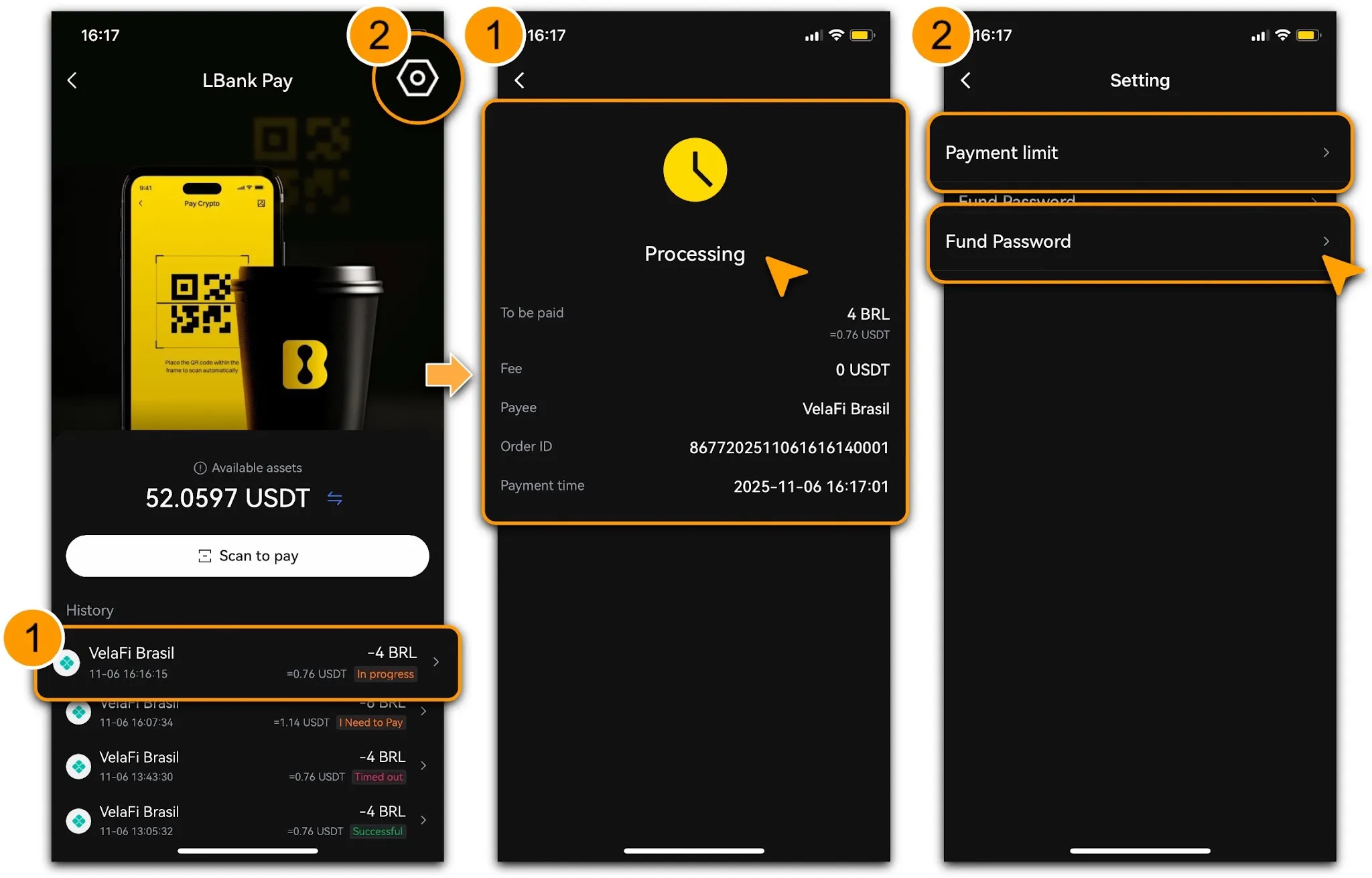
As shown, after payment, users can tap the corresponding order under「History」to check processing status and details, including「Amount to be Paid」,「Fee」,「Payee」,「Order ID」, and「Payment Time」.
-
Users may adjust「Payment Limits」and「Fund Password」in「Setting」as needed.
-
To scan again, tap「Scan to Pay」on the current payment record page.
📌Reminders:
-
Carefully confirm Amount「To be Paid」before tapping「Confirm Payment」;
-
Ensure stable network before payment;
-
If payment fails, retry within 30 minutes. The system prompts recharge if balance is insufficient.
Important Notes
-
Fees:Banks or third-party channels may charge additional fees. LBank Pay settles at real-time exchange rates with no hidden costs.
-
Compliance Statement:In Vietnam, LBank Pay provides fiat settlement through licensed payment institutions; all receipts, payments, and clearing are executed by partners in accordance with local regulations. Digital assets are not used as payment instruments within Vietnam. LBank does not directly provide local acquiring or clearing services. Feature scope is subject to institutional licensing and may change due to regulatory adjustments.
-
Security Advice:Scan only trusted merchant QR codes and avoid public Wi-Fi. Enable 2FA. For issues, contact official support (📮 fiatcs@lbank.com).
-
Limit Management:Exceeding limits requires KYC upgrade; the platform reserves the right to adjust services for risk control.
Through integration with Quick Buy Crypto and P2P trading, LBank Pay forms a closed loop for crypto deposits and withdrawals, enhancing user experience.
Risk Disclosure
Digital asset prices are highly volatile, and transactions carry risk of loss. Stay vigilant against fraud and off-platform inducements. The platform does not guarantee profits or optimal pricing and prohibits use for evading forex controls, gambling, or other illegal activities.